
A Simpler, More Structured Way to Improve Throttle Response
Throttle response is one of the first things a driver notices about an EFI system.
An engine may start easily, idle smoothly, cruise at the correct air/fuel ratio, and make strong power at wide-open throttle. But if it hesitates, stumbles, pops, or bogs when the throttle opens, the entire calibration can feel unfinished. That brief transition is where transient fuel becomes important.
Modern EFI systems can control transient fuel in far more detail than a traditional carburetor. The problem was never a lack of control. The challenge was making that control easier to understand and providing a clear place to start.
That is why we developed Aces Pump Shot Dynamics™: a structured approach that establishes a practical starting point through the Setup Wizard while preserving the deeper calibration controls experienced tuners may need.
What Is Transient Fuel?
Most performance enthusiasts are already familiar with the accelerator pump on a carburetor.
When the throttle opens, airflow increases almost immediately. Fuel does not always reach the cylinders at the same rate, especially in a wet-flow intake manifold where some fuel may temporarily collect on the manifold walls. Without additional fuel during that transition, the engine may hesitate or fall flat. This is referred to as Transient Fuel.
A carburetor addresses this with an accelerator-pump shot. EFI performs a similar job electronically, using information such as throttle movement, engine speed, temperature, and engine load to determine how much additional fuel is needed.
That is why the software uses the familiar term Accelerator Pump—the same term car guys already know from working with carburetors.
What Is Aces Pump Shot Dynamics?
Aces Pump Shot Dynamics organizes transient-fuel control around a straightforward idea: the engine needs the correct amount of fuel when the throttle first opens, and that fuel needs to remain available for the correct length of time.
Those two parts of the event are controlled separately:
- Accelerator Pump Shot Limit establishes the maximum initial pump-shot contribution.
- Pump Shot Duration Profile determines how long the transient-fuel event is allowed to continue at different engine speeds.
The easiest way to understand these controls is to think of them as peak and duration. Peak sets how strong the first hit is allowed to be. Duration sets how long the supporting fuel is allowed to carry after that hit.
Separating these controls matters because adding more initial fuel and extending the event do not produce the same result. One engine may need a stronger first hit without needing a longer tail. Another may respond correctly at first but need the fuel to carry slightly longer as the engine begins to take load.
Peak: The Initial Pump Shot
The Accelerator Pump Shot Limit sets the upper boundary for the initial fuel contribution when the throttle opens.
The simplest way to think about it is as the maximum size of the electronic pump shot. If the engine receives too little fuel immediately after throttle movement, the result may be an instant lean stumble, hesitation, pop, or sneeze. Too much initial fuel can produce a rich bog or lazy response.
However, the Pump Shot Limit is not simply an “add fuel” adjustment. It is a ceiling. If the ECU is requesting less fuel than the selected limit allows, increasing the limit will not change the fuel actually delivered. The setting matters only when the requested pump shot reaches that ceiling.
The Setup Wizard uses engine displacement to establish a practical starting limit. The ECU then shapes the actual response using throttle movement and the rest of the calibration.
Duration: How Long the Fuel Carries
The Pump Shot Duration Profile controls the maximum window in which the transient-fuel event is allowed to remain active.
Duration usually does not change the first hit. Instead, it affects how much fuel follows the initial response. Too little duration can allow the engine to respond correctly at first and then hesitate as the vehicle begins to accelerate. Too much duration can leave fuel in the event longer than necessary, creating a rich or lazy tail.
Additionally, duration is a maximum window, not a timer that forces fuel to stay on. If the ECU has already faded the pump shot out, selecting a longer profile may make little or no difference.
This is why Aces Pump Shot Dynamics does not combine peak and duration into one global enrichment adjustment. They affect different parts of the throttle event and need to remain independently controllable.

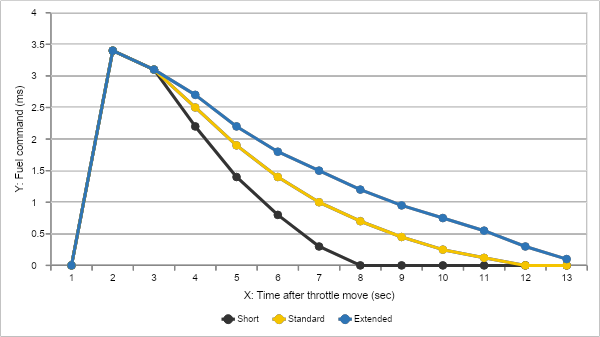
Choosing a Pump Shot Duration Profile
The Setup Wizard provides three starting profiles:
- Short
- Standard
- Extended
These profiles are starting points, not rigid rules based only on engine size, intake height, or a single component.
| Profile | When to begin with it |
|---|---|
| Short | The engine responds quickly, the initial hit is already sufficient, and additional carry tends to create a rich or lazy tail. |
| Standard | The recommended starting point for most street-driven TBI applications and the best selection when you are unsure. |
| Extended | The initial response is good, but the engine appears to need additional fuel carry through the rest of the transition. |
Short
The Short profile allows the transient event to finish more quickly. It is useful when the engine accepts the initial pump shot well and does not require much additional fuel carry. It may also help when a longer profile makes the engine feel rich, heavy, or lazy after the first response.
Short does not automatically mean “small engine” or “low-rise intake.” It simply means that the specific engine and vehicle combination responds better with a shorter fuel-carry window.
Standard
Standard is the recommended starting profile for most street-driven combinations.
It provides additional carry through common low- and midrange operating areas, then reduces the duration as engine speed increases.
When you are unsure which profile to select, begin with Standard, complete the Wizard, and evaluate how the vehicle drives before making further changes.
Extended
Extended provides more fuel carry through the transition, particularly in the lower and middle RPM ranges.
It is intended for situations where the engine responds correctly when the throttle first opens but develops a second hesitation or lean sag shortly afterward.
In that situation, the initial pump shot may already be correct. The event may simply be ending before the engine has completed the transition into the new load condition.
Extended should not be selected only because an intake manifold looks tall or has long runners. Intake design can influence fuel behavior, but so can displacement, camshaft, vehicle weight, gearing, converter selection, injector characteristics, temperature, and fuel pressure.
The correct profile is the one that produces the best repeatable vehicle response.
Why Different Engines Need Different Pump-Shot Shapes
During development, we evaluated Aces Pump Shot Dynamics on two very different engine combinations: a turbocharged 302 and a 454-cubic-inch big-block.
The 302 responded well to a moderate initial pump shot with longer fuel carry through the low and middle RPM ranges.
The 454 accepted a larger initial pump shot but did not benefit from a longer duration. Extending the event mainly added fuel after the initial hit, producing a richer tail without improving drivability.
These combinations demonstrated two different but equally valid strategies:
Lower peak with longer duration
and
Higher peak with shorter, targeted carry
This does not mean every smaller engine needs Extended or every big-block needs Short. The important lesson is that the amount of the first hit and the length of the event are separate parts of the calibration. A single “add more acceleration fuel” adjustment cannot properly describe every engine combination.
| Item | Mustang 302 Turbo | Camaro 454 BBC |
|---|---|---|
| Accel Pump Shot Limit | 3.8 ms | 4.2 ms |
| MAP Load Assist Limit | 0.4–0.5 ms | about 0.5 ms |
| Pump Shot Duration character | Longer carry | Shorter carry |
| Tuning style | Lower peak + longer carry | Higher peak + shorter carry |
| Main takeaway | Needed more fuel carry through the transition | More duration mainly added rich tail area |
MAP Load Assist: More Than Throttle Movement
Most normal throttle events are handled through the Accelerator Pump path, which responds directly to throttle movement.
However, throttle position does not always tell the complete story. An engine can experience a rapid increase in load with relatively little pedal movement. This can happen while:
- Accelerating in a higher gear
- Climbing a hill
- Moving a heavy vehicle from a low engine speed
- Driving a combination with a tall rear gear or tight converter
For those conditions, Aces Pump Shot Dynamics includes a separate MAP Load Assist path. MAP Load Assist monitors how quickly manifold pressure rises and can provide additional support during a load-led transition.
Keeping the Accelerator Pump and MAP Load Assist paths separate allows the calibration to address what is actually happening instead of treating every hesitation as the same problem.
A Simpler Starting Process
For most users, the process begins in the Setup Wizard:
- Enter the required engine information.
- Select Short, Standard, or Extended for the Pump Shot Duration Profile.
- Complete the Wizard and save the baseline calibration.
- Bring the engine to normal operating temperature.
- Drive the vehicle and evaluate the response before making additional changes.
Before changing Pump Shot settings, make sure the engine is fully warm and that fuel pressure, timing, and the base tune are in the ballpark. If the engine is wrong everywhere—not just when you tip in—it is probably not a Pump Shot problem.
When the vehicle responds correctly, no additional adjustment is required. When a problem does exist, focus on when and how it happens.
| What the vehicle does | What may need attention |
|---|---|
| Hesitates or bogs immediately when the throttle opens | Initial Accelerator Pump responsec |
| Responds correctly at first, then develops a second sag | Duration, fuel carry, or load assistance |
| Problem occurs mainly in high gear, uphill, or under heavier load | MAP Load Assist |
| Warm response is correct, but cold response is not | Cold transient-fuel adjustment |
| Remains rich or lean after the throttle transition is over | Base fuel calibration rather than Pump Shot settings |
Not every hesitation should be corrected by adding fuel everywhere. The timing of the problem and the driving condition help identify which part of the event should be evaluated.
Easier to Start Without Removing Advanced Control
Aces Pump Shot Dynamics is not a claim that one setting will automatically tune every engine.
Correct injector information, fuel pressure, ignition timing, sensor calibration, target air/fuel ratios, and base fuel tables still matter. Transient fuel cannot compensate for a mechanical problem or an incorrect base calibration.
What Pump Shot Dynamics provides is a clearer starting point. The Setup Wizard allows users to begin with understandable profile selections instead of being presented immediately with a long list of engineering variables.
Dealers and experienced tuners still retain access to:
- Throttle-speed fuel tables
- Throttle-position trims
- MAP Load Assist
- Cold multipliers
- Retention controls
- Custom peak and duration settings
The capability has not been reduced. It has been organized into a process that is easier to understand and easier to use.
Set the Baseline. Shape the Response.
Aces Pump Shot Dynamics provides a practical way to establish the initial pump shot, select the appropriate fuel-carry profile, and evaluate the vehicle based on how it actually responds.
Begin with the Setup Wizard. Select Standard when you are unsure. Drive the vehicle before making additional changes. Then adjust only the part of the event that needs attention.
Set the baseline. Shape the response. Open the envelope only when needed.
Hongjun Ma
CEO, Founder, & Engineer

1 comentario
pedro perez
is this available on the 1st gen royal flush
Dejar un comentario
Este sitio está protegido por hCaptcha y se aplican la Política de privacidad de hCaptcha y los Términos del servicio.