
Did you know that Aces’s software tracks over 2,000 variables? It’s true! In order to help you get up to speed on what these variables control and how best to use them to your advantage, we’ll be going over some of them here each week. Whether you’re new to tuning or a veteran, we hope these descriptions will make the whole process just a little less opaque. Also, we're introducing a new tool to keep track of these variables, the Settings Glossary. Use it to search for these definitions at your leisure!
Let’s get started!
-
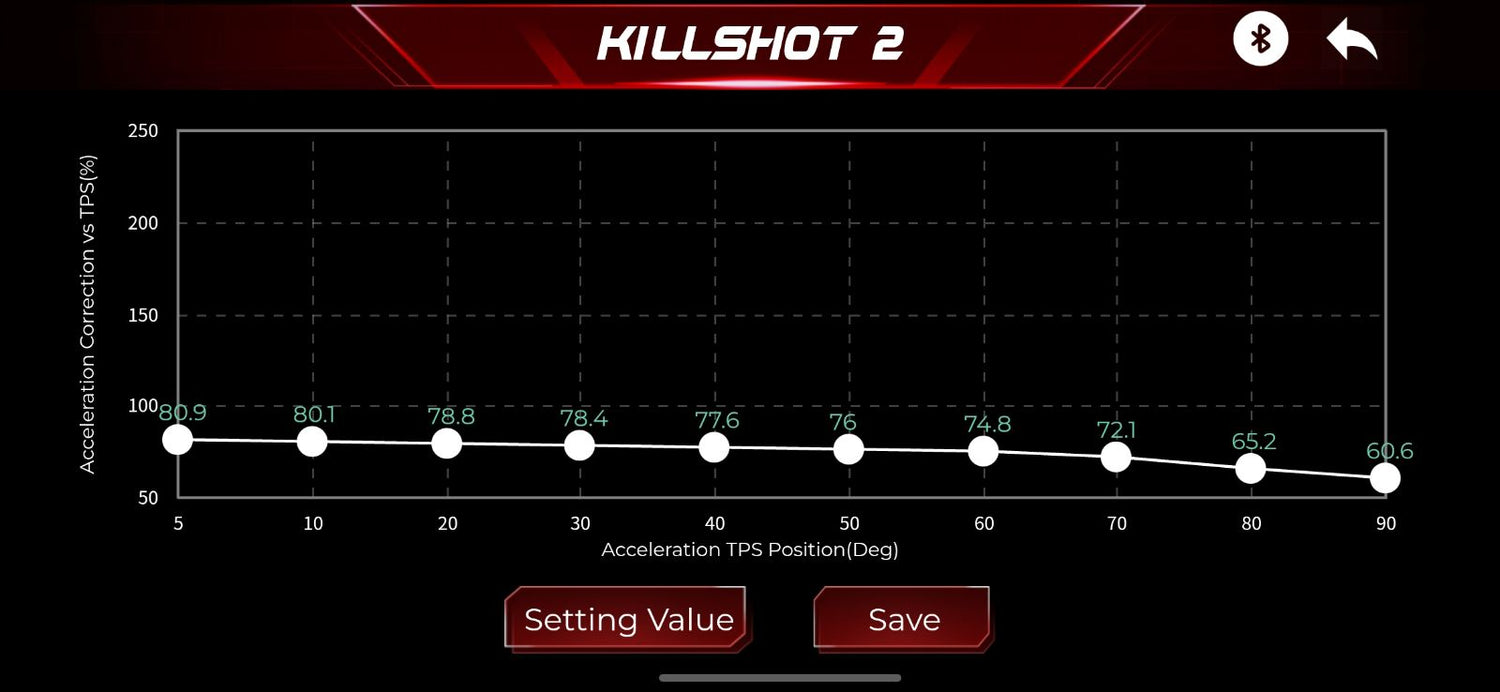
Acceleration Correction vs. TPS (Throttle Position Sensor):
Sets how much transient fuel is added for a given throttle-position change.
Increase the values if the engine goes lean or hesitates during a quick throttle opening; decrease them if it becomes excessively rich. -
Acceleration ECT (Engine Coolant Temperature):
Defines the coolant-temperature breakpoints for acceleration enrichment.
Change the temperature breakpoints only when you need different cold-versus-hot tuning regions, and keep them in ascending order. -
Acceleration TPS Position:
Defines the throttle-position breakpoints used by acceleration enrichment.
Change them to concentrate tuning resolution in the throttle range where tip-in hesitation occurs, keeping the points in ascending order. -
AFR (Air-Fuel Ratio) MAP (Manifold Absolute Pressure):
Defines the manifold-pressure/load breakpoints for the target-AFR table.
Change them only to redistribute table resolution across vacuum and boost/load areas, keeping the values in ascending order. -
AFR RPM (Rotations Per Minute):
Defines the engine-speed breakpoints for the target-AFR table.
Change them to place more tuning resolution in important RPM ranges, keeping the values in ascending order. -
After Start Decay Cycle:
Sets the time step used to fade after-start fuel enrichment after the engine begins running.
Increase it to make the extra fuel remain longer, or decrease it to remove the enrichment sooner. -
After Start Decay Rate:
Controls how quickly after-start enrichment is removed. Higher values generally make the enrichment decay faster, while lower values keep extra fuel longer.
Change when cold or hot restarts are briefly too rich or too lean. -
After Start ECT:
Defines the coolant-temperature breakpoints for after-start enrichment.
Change only to create different correction regions for cold, warm, and hot starts, and keep the values in ascending order. -
After Start Enrichment:
Sets the extra fuel applied immediately after the engine starts, based on temperature and RPM.
Increase cells when the engine starts but then goes lean or stalls; decrease them when it loads up, smokes, or runs overly rich after starting. -
Bat Vol (Battery Voltage):
Defines the battery-voltage breakpoints used for voltage compensation.
Change them only if the table needs to cover a different electrical-system range, keeping the points in ascending order. -
Catalyst Protection Enrich Gain:
Sets the additional fuel used by the catalyst/exhaust-temperature protection strategy.
Increase only when more enrichment is required under sustained high load; decrease it cautiously because insufficient enrichment can raise exhaust temperature. -
Clear Flood TPS:
Sets the throttle-position threshold that activates clear-flood mode during cranking, typically reducing or disabling injector fuel.
Change it only if the installed throttle calibration prevents the mode from engaging correctly; set it high enough to avoid accidental activation. -
Cranking Fuel:
Defines injector pulse width during cranking across coolant temperature and engine speed.
Increase cells when the engine cranks without enough fuel; decrease them when plugs foul, fuel odor is strong, or hot starts are overly rich. -
Cranking Fuel Adaptation:
Enables learned or adaptive correction of cranking fuel.
Turn on when the strategy is supported and you want repeated starts to refine fueling; leave off while establishing a known, fixed cranking calibration. -
Cruise AFR:
Sets the commanded air/fuel ratio used during steady cruise when the single-value cruise target is active. A higher AFR number is leaner and a lower number is richer.
Change only after confirming stable closed-loop operation and safe combustion. -
Decel Fuel Cut:
Enables deceleration fuel cut, which stops or reduces injection during closed-throttle overrun.
Turn on to reduce fuel use and exhaust heat during decel; turn it off if it causes stalling, harsh re-entry, or drivability issues while the thresholds are being tuned. -
ECT AFR Offset:
Applies a temperature-based offset to the commanded AFR.
Use to temporarily command richer or leaner mixtures as the engine warms; verify the sign convention before changing values. -
ECT Fuel Enrichment:
Adds or removes fuel based on coolant temperature.
Increase cold-temperature values when the engine is lean during warm-up; decrease them when cold operation is overly rich, and taper the correction toward zero at normal temperature. -
ECT x (vs. Fuel):
Defines the engine coolant temperature breakpoints used by the Fuel table (°C).
Change these points to place more table resolution in the operating range you need to tune; keep them in ascending order and then review the table values after changing the axis. -
ECT x Point:
Defines the engine coolant temperature breakpoints used by the Fuel table (°C).
Change these points to place more table resolution in the operating range you need to tune; keep them in ascending order and then review the table values after changing the axis. -
FPS (Fuel Pressure Sensor):
Defines the pressure values paired with the fuel-pressure sensor voltage table.
Enter the installed sensor's datasheet values and verify the reading with a mechanical gauge; do not use this table to correct an actual fuel-pressure problem. -
FPS x Point:
Defines the voltage breakpoints for the fuel-pressure sensor calibration (volts).
Change only to match the installed sensor's voltage-to-pressure data, keeping each voltage paired with the correct pressure value. -
Fuel Inj FPS Compe En (Injector Compensation):
Enables injector-flow compensation using measured fuel pressure.
Turn on only when a correctly calibrated fuel-pressure sensor is installed and the pressure reference is configured; otherwise leave it off. -
Fuel Learn:
Enables long-term fuel learning from closed-loop oxygen-sensor feedback.
Turn on after the base fuel and target-AFR tables are reasonably close; turn it off during diagnosis or when you need the calibration to remain unchanged. -
Fuel Learn Cycle:
Sets how often the ECU updates long-term fuel learning. A shorter cycle learns more quickly but may react to transient noise; a longer cycle learns more slowly and smoothly. -
Fuel Learn Max Limit:
Sets the maximum positive fuel correction that long-term learning may store or apply.
Raise only when the base tune is known to need more correction; lower to prevent large learned enrichment from hiding a calibration or hardware problem. -
Fuel Learn Min ECT:
Sets the minimum coolant temperature required before fuel learning begins.
Raise to prevent learning during warm-up, or lower only when the engine and oxygen sensor are stable enough to learn accurately at cooler temperatures. -
Fuel Learn Min Limit:
Sets the maximum negative fuel correction that long-term learning may store or apply.
Make negative only when the base tune legitimately needs fuel removed; tweak conservatively so learning cannot hide a sensor or fuel-system problem. -
Fuel Learn Rate:
Sets how aggressively long-term fuel learning changes the stored correction.
Increase for faster learning, or decrease for smoother, more conservative updates when the learned table is unstable. -
Fuel Learn Read Coef:
Sets how aggressively long-term fuel learning changes the stored correction.
Increase for faster learning, or decrease for smoother, more conservative updates when the learned table is unstable. -
Fuel Loop:
Enables closed-loop fuel correction using wideband oxygen-sensor feedback.
Turn on for normal self-correction after the sensor and target AFR are verified; turn off for open-loop testing or sensor troubleshooting. -
Fuel Loop Min ECT:
Sets the minimum coolant temperature required before closed-loop fuel correction begins.
Raise to keep warm-up fueling open loop longer, or lower only if the wideband is active and stable sooner. -
Fuel Power On Percent:
Sets a global fuel offset percentage applied by the fuel strategy.
Increase to add fuel broadly or decrease to remove fuel; use it only for temporary overall correction, then fix injector, pressure, or VE settings if the offset is consistently needed. -
Fuel Prime Percent:
Sets the amount of priming fuel delivered when the system is powered on before cranking.
Increase if the engine needs more fuel for the first start attempt; decrease if it floods or produces a strong fuel smell before cranking. -
Fuel Self Learn Table:
Displays or stores the learned fuel correction by operating cell. Positive values add fuel and negative values remove fuel.
Review the pattern to improve the base fuel table, and edit or clear cells only when correcting known bad learning. -
Fuel System Pressure:
Sets the reference fuel pressure used to calculate injector delivery.
Enter the actual pressure differential at which the injector flow rating is specified; an incorrect value will make the entire fuel calculation inaccurate. -
Idle AFR:
Sets the commanded air/fuel ratio at idle when the single-value idle target is active. A higher number is leaner and a lower number is richer.
Adjust it for idle quality, emissions, and fuel stability while watching misfire and exhaust temperature. -
Inj Startup RPM:
Defines the engine speed breakpoints used by this table (RPM).
Change these points to place more table resolution in the operating range you need to tune; keep them in ascending order and then review the table values after changing the axis. -
Injector Off Time:
Defines injector dead time/offset across battery voltage.
Enter data for the installed injectors and fuel pressure; incorrect values cause fueling errors that are most noticeable at idle and low pulse widths. -
Learn MAP x:
Defines the manifold pressure/load breakpoints used by this table (kPa).
Change these points to place more table resolution in the operating range you need to tune; keep them in ascending order and then review the table values after changing the axis. -
Learn RPM y:
Defines the engine speed breakpoints used by this table (RPM).
Change these points to place more table resolution in the operating range you need to tune; keep them in ascending order and then review the table values after changing the axis. -
Loop Max Limit:
Sets the maximum positive short-term closed-loop fuel correction.
Increase only if additional enrichment authority is needed; reduce to prevent closed loop from masking a base-fuel or hardware problem. -
Loop Min Limit:
Sets the maximum negative short-term closed-loop fuel correction.
Allow more negative correction only when necessary; keep the limit conservative so closed loop cannot remove excessive fuel because of a bad sensor or base calibration.
We’re updating and defining more variables all the time. Watch this space to learn how you can get the most out of your Aces system.
Happy Tuning!


Dejar un comentario
Este sitio está protegido por hCaptcha y se aplican la Política de privacidad de hCaptcha y los Términos del servicio.